
ITSM guide · ITIL 4
What is ITSM? A practical guide to IT service management
ITSM (IT service management) is how an IT department designs, delivers, supports and improves the services people rely on, from the service desk and laptops to business applications. This guide explains what ITSM covers, how it relates to ITIL 4, the core processes, what an ITSM tool does and how to start.
Updated October 2026 · SMC Consulting · ITIL v4
Reviewed by the ITIL v4 certified consultants of SMC Consulting. Source: ITIL 4, AXELOS (PeopleCert).

ITSM definition in one paragraph
ITSM, short for IT service management, is the set of practices an organisation uses to plan, deliver, support and improve IT as services for the business. Instead of managing servers, laptops and applications one by one, ITSM starts from what people actually use (email, the ERP, a laptop for a new starter, access to a shared folder) and organises the people, processes and tools behind each service so it is delivered at an agreed level and improves over time.
ITSM is broader than IT support. Support fixes what breaks; ITSM also decides which services exist, what users can expect from them, how changes are approved, how knowledge is shared and how performance is measured. The help desk is one part of ITSM, not the whole of it.
| IT support | IT service management | |
|---|---|---|
| Focus | Fixing what breaks | Delivering and improving services |
| Starts | When a user calls | Before a service goes live |
| Measures | Tickets closed | Service levels, user experience, cost |
| Owned by | The help desk | IT management, with the business |
Why ITSM matters: predictability, cost, risk, user experience
Few organisations start an ITSM project because of a framework. They start because tickets get lost, the same incident returns every week, a change takes down a critical application, or nobody can tell management whether the service desk is doing well. ITSM answers those problems in five ways.
- Predictability. Clear workflows, owners and service levels: users know what to expect and when, agents know what to do next.
- Transparency. Reporting on workload, bottlenecks and service quality, so priorities are set on data rather than on the latest escalation.
- Efficiency. Standard forms, reusable knowledge and automation take repetitive work off the team and shorten resolution times.
- Risk control. Structured change enablement and a reliable view of what depends on what reduce outages caused by changes, and give auditors the evidence they ask for (ISO 27001, NIS2).
- Business alignment. Services described in business language, with priorities that follow business impact rather than the order in which tickets arrive.
For users, the difference is one place to ask for help, fewer repeated questions and status updates they do not have to chase. For IT managers, it is a backlog under control and figures they can stand behind in front of management.
ITSM vs ITIL 4: framework vs practice
ITSM is the discipline; ITIL is the best-known framework for practising it. Put simply, ITSM management is what your IT team does every day; ITIL service management is one documented way of doing it. ITIL 4, published by AXELOS (now part of PeopleCert), describes how to run IT services through a service value system: guiding principles, governance, a service value chain, practices and continual improvement.
The service value chain has six activities (plan, improve, engage, design and transition, obtain or build, deliver and support). ITIL 4 describes 34 management practices that support them, from incident management and change enablement to service level management and IT asset management. Nobody implements all 34 at once: most organisations start with five or six and add others as they mature.
Seven guiding principles keep the framework practical: focus on value; start where you are; progress iteratively with feedback; collaborate and promote visibility; think and work holistically; keep it simple and practical; optimise and automate. In projects, "start where you are" matters most: good ITSM builds on the tools, data and habits you already have.
ITIL is not the only reference. COBIT focuses on IT governance, ISO/IEC 20000 is the certifiable standard for service management, and many teams combine ITIL with Lean or DevOps practices. For a process-by-process view, read what the ITIL processes are and what a service manager does. Our ITIL v4 certified consultants apply the framework to your organisation rather than copying it.
| ITSM | ITIL 4 | |
|---|---|---|
| What it is | A discipline: managing IT as services | A framework of good practice for that discipline |
| Who defines it | Each organisation, for its own services | AXELOS (PeopleCert), the publisher |
| Certification | Organisations, through ISO/IEC 20000 | People, through ITIL 4 certificates |
The four dimensions of service management
ITIL 4 asks you to look at every service from four angles. Projects that focus on only one of them, usually the tool, are the ones that stall.
- Organisations and people. Who does what, with which skills, and how teams work together. A new process changes habits; without clear roles, training and management support, people drift back to email and phone.
- Information and technology. The ITSM platform, but also the data it holds: categories, the CMDB, knowledge articles and the integrations with monitoring, identity and collaboration tools. Reports are only as good as the data entered when each ticket is logged.
- Partners and suppliers. Most IT services depend on outside parties: cloud providers, software vendors, outsourced support. Their contracts, escalation paths and service levels have to match the commitments you make to your users.
- Value streams and processes. The sequence of activities that turns a request or an incident into a result for the user, and the handovers between teams along the way. This is where most waiting time hides.
A useful test for any ITSM change: say in one sentence what changes in each of the four dimensions. If one of them stays empty, the change is probably incomplete.
ITSM roles: who does what
Three roles carry most of the work. The process owner decides how a practice works (change enablement, for example), measures it and improves it; there is one per practice, not one per team. The service owner is accountable for a service from end to end, from what users can expect to its cost and its suppliers. The service desk is the single point of contact for users: it logs every request, resolves what it can at first contact and coordinates the rest. In smaller organisations one person often holds several roles; what matters is that each one has a name. Around them work the resolver groups, the change approvers and the service manager, who keeps the whole service on track.
ITIL keeps evolving: PeopleCert, which now publishes ITIL, has released ITIL Version 5, with certifications such as ITIL Foundation (Version 5) and ITIL AI Governance. This guide uses the ITIL 4 vocabulary (practices, service value system, four dimensions), which ITSM tools and ITIL 4 certified teams already share.
The core ITSM processes
ITIL 4 calls them practices; most teams still say processes. These seven carry most of the daily work. Around them sit the service desk, the single point of contact for users, and service level management, which sets the targets they are measured against.
Incident management
Incident managementRestores normal service as fast as possible after an unplanned interruption: logging, prioritisation by impact and urgency, escalation before an SLA is breached, and a clean record at closure. In HaloITSM, see incident management in HaloITSM.
Problem management
Problem managementFinds and removes the root cause of recurring incidents, records known errors and workarounds, and stops the same ticket from coming back every week.
Change enablement
Change managementGets changes into production without breaking what works: standard, normal and emergency changes, risk assessment, and a change advisory board where the risk justifies one. See also change management in ITSM.
Service request management
Service request managementHandles the predictable requests (access, equipment, software, information) through a service catalogue, forms and approvals, kept separate from incidents.
Knowledge management
Knowledge managementCaptures what agents learn so the next person does not start from zero: articles for agents, and answers for users in the self-service portal.
Service configuration management
CMDBRecords the configuration items (servers, applications, services) in a CMDB, with how they depend on each other, so you see the impact of an incident or a change before it spreads. For containers and cloud services, see cloud CMDB and dependency mapping.
IT asset management (ITAM)
IT asset managementFollows hardware and software through their lifecycle, from purchase to disposal, with costs, contracts and software licences under control. As a service, whatever your tool: IT asset management.
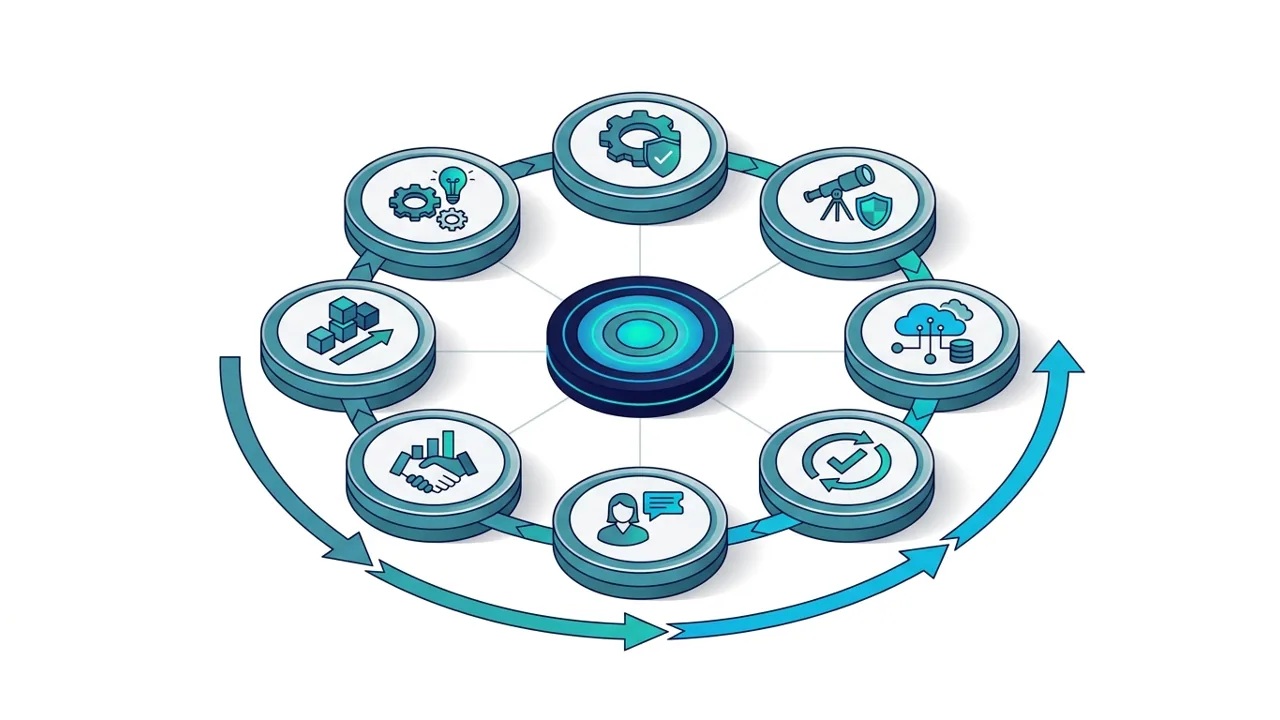
ITSM beyond the basics: automation, AI and ESM
Once the core processes run, three extensions bring the most value. All three depend on the basics: automation and AI only work on clean categories, a maintained knowledge base and reliable data.
ITSM automation and orchestration
ITSM automationAutomatic routing, approvals, notifications and fulfilment, plus integrations with Teams, monitoring and development tools. Automate the process you fixed, not the broken one.
AI for ITSM
AI for ITSMTicket classification, suggested answers, AI-assisted knowledge and voice agents that take first-line calls. Valuable when the data underneath can be trusted.
Enterprise service management (ESM)
Enterprise service managementThe same portal, catalogue and workflows applied to HR, facilities, finance or legal, so employees have one place to ask for help.
ITSM tools: what a platform does (and doesn't)
An ITSM tool, or ITSM platform, is the software that supports these processes: a ticketing engine with SLAs and workflows, a self-service portal and service catalogue, a knowledge base, a CMDB and asset inventory, reporting, automation and integrations. Most are sold as SaaS, priced per agent.
What a tool does not do: decide your priorities, define your services, design your categories or convince people to use the portal. Those come from the processes and from change management. A well-configured mid-range tool does more for users than a powerful platform left on its default settings.
We advise on ten platforms: HaloITSM, ServiceNow ITSM, Freshservice, Jira Service Management, TOPdesk, EasyVista Service Manager, Ivanti Neurons for ITSM, Xurrent (formerly 4me), GLPI and ManageEngine ServiceDesk Plus (not yet delivered by SMC Consulting). HaloITSM is our pick for most mid-sized organisations. Our advice is independent. If you choose HaloITSM, we can also supply the licences as its certified partner, and we tell you so up front.
If you are choosing a platform, set your criteria and scope first with our ITSM vendor evaluation criteria. To compare the tools side by side, read our comparison of the 10 best ITSM tools; to see what we do on each one, see the 10 ITSM platforms we work on.
How to measure whether ITSM works
Activity figures (tickets opened, tickets closed) say how busy the team is, not how good the service is. A short set of outcome indicators, reviewed every month with the people who can act on them, tells you far more. Start with these, then read our guide to ITSM KPIs for definitions and targets.
| Indicator | What it shows |
|---|---|
| Mean time to resolve (MTTR) | How long users wait for a fix, per priority |
| First contact resolution | How much is solved without escalation or call-back |
| SLA compliance | Whether the service levels you promised are kept |
| Backlog age | Where tickets get stuck, and for how long |
| Reopen rate | Whether fixes hold or the same issue comes back |
| Change success rate | How many changes go live without causing an incident |
| User satisfaction (CSAT, XLA) | How users experience the service, beyond the clock |
How to start an ITSM project in 5 steps
Whatever the tool, the order matters: understand where you stand, fix the processes, then configure and measure. This is the method our ITSM consultants follow, with ITSM project management for larger programmes.
Free 30-minute audit
A senior consultant takes stock with you: support organisation, volumes, tools, main friction points and goals. You leave with a maturity score and your three priorities.
In-depth diagnosis in two weeks
Your processes, ticket data, governance and how your teams really use the tool, analysed and turned into a prioritised action plan.
Prioritised, costed roadmap
Quick wins and structural workstreams, with a realistic budget and schedule, validated with your IT management.
Execution with your teams
Our consultants lead or reinforce the workstreams: ITIL v4 processes, tool configuration, change management and training.
Results measured at six months
The indicators set at the start are measured again: backlog, resolution times, user satisfaction and adoption.
Five mistakes that slow ITSM projects down
- Starting with the tool. A new platform configured on top of unclear processes reproduces the same problems, faster and at a higher cost.
- Copying ITIL word for word. ITIL describes good practice; it does not tell you how many approval steps your organisation needs. Adapt it, keep what users will follow.
- Too many categories. Fifty categories nobody chooses correctly give worse reporting than twelve that everyone understands.
- No process owner. Every process needs one person who decides, measures and improves it. Without an owner, the rules erode within months.
- Forgetting the users. A portal nobody uses is a cost, not a service. Communication, training and a catalogue written in the users' words decide adoption.
Not ready to talk yet? Start with these
- The ITSM ITIL v4 checklist: twelve questions to check whether your ITSM is operational or only deployed.
- The total cost of an ITSM tool: a method and spreadsheet model to estimate the real cost over three years, beyond the price per agent.
- Service desk KPIs and dashboards: what to track on the service desk, from SLAs to user experience.
They trust us on their ITSM projects


ITSM: frequently asked questions
What does ITSM stand for?
ITSM stands for IT service management: the practices an organisation uses to plan, deliver, support and improve IT as services for its users. It covers the service desk, but also service levels, changes, knowledge, assets and continual improvement.
What is the difference between ITIL and ITSM?
ITSM is the discipline of managing IT as services. ITIL is a framework of good practice for doing it, published by AXELOS (PeopleCert); ITIL 4 describes a service value system and 34 practices. You can practise ITSM without ITIL, but most organisations use ITIL as their reference.
What are the main ITSM processes?
Incident management, problem management, change enablement, service request management, knowledge management, service configuration management (CMDB) and IT asset management, supported by the service desk and service level management. Most organisations start with incidents and requests, then add change and knowledge.
Is ITSM only for IT departments?
No. The same practices (a portal, a service catalogue, workflows and service levels) work for HR, facilities, finance or legal. Applied beyond IT, this is called enterprise service management (ESM). It works best once IT's own processes are stable.
What is an ITSM tool?
Software that supports ITSM processes: ticketing with SLAs, a self-service portal, a knowledge base, a CMDB, reporting and automation. HaloITSM, ServiceNow ITSM, Freshservice, Jira Service Management and TOPdesk are examples. The tool supports the processes; it does not replace them.
How long does it take to implement ITSM?
It depends on scope and maturity. A focused first phase (incidents, requests and the portal on a mid-market platform) takes a few months; a broader programme with change, CMDB and integrations takes longer. Our method starts with a two-week diagnosis so the plan rests on your own data, and results are measured at six months.
Find out where your ITSM stands
A free 30-minute audit with a senior ITIL v4 certified consultant. You leave with a maturity score and your three priorities, whatever tool you use.